Contents
Contents
- Acknowledgements
- Getting Started
- Design & Implementation
- Product Scope
- Target user profile
- Value proposition
- User Stories
- Non-Functional Requirements
- Glossary
- Instructions for manual testing
Acknowledgements
- EduRec: For the list of possible module mappings
Getting started
Refer to our user guide here
Design & implementation

The Architecture Diagram above explains the high-level design of the App.
Main Components
The main class of SEPlanner is the Duke class. It is responsible for initializing the other components when the program
gets started while handling interactions between the other components.
The other core components of SEPlanner are:
Ui : Handles the UI of SEPlanner and prints outputs to the user.
Parser: Handles user inputs and pass them down to the Command class.
Command : Handles output passed down from Parser based on the user inputs and execute user instructions.
Storage : Loads data from, and stores data back to the user’s local machine.
UniversityList and ModuleList : Stores information about Universities and modules as well as the methods to amend and filter them.
Command Implementation
Step 1. When the beginner user launches the application, to see the list of all universities available for the SEP program, the user executes list /muni command. To see the list of all NUS modules available for the SEP program, the user can executes list /mmod command.
Step 2. The user then module executes add /uni Boston University command to call addUniCommand(university, list) and add his preferred university to the selected university list. The other option for the user is to execute add /uni 4 command to call addUniCommand(index, list) to add to the list.
Step 3. The user executes add /mod CS1231 command to call addModCommand(module, list) and add his preferred NUS module to the selected module list. The other option for the user is to execute add /mod 81 command to call addModCommand(index, list) to add to the list.
Step 4. The user executes list /suni to see his selected university list. The user executes list /smod command to see his selected module list.
Step 5. The user executes remove /mod 81 command to delete unwanted modules from see his selected module list. The user executes remove /uni 4 command to delete unwanted university see his selected university list.
Step 6. The user executes find /mod CS1231 to find the master index of the module. The user executes find /mod Boston University to find the master index of the university.
Step 7. The user executes searchmap 4 command to see the module mapping of all modules in the selected module list in Boston University.
Step 8. The user executes add /map 4 1 command to add the first module mapping available under Boston University.
Step 9. The user executes remove /map 4 1 command to remove the first mapping allocated to Boston University.
Step 10. The user executes exit command to terminate the program.
Ui
The Ui component consolidates and formats the output of the program before displaying it to the user in the command line.
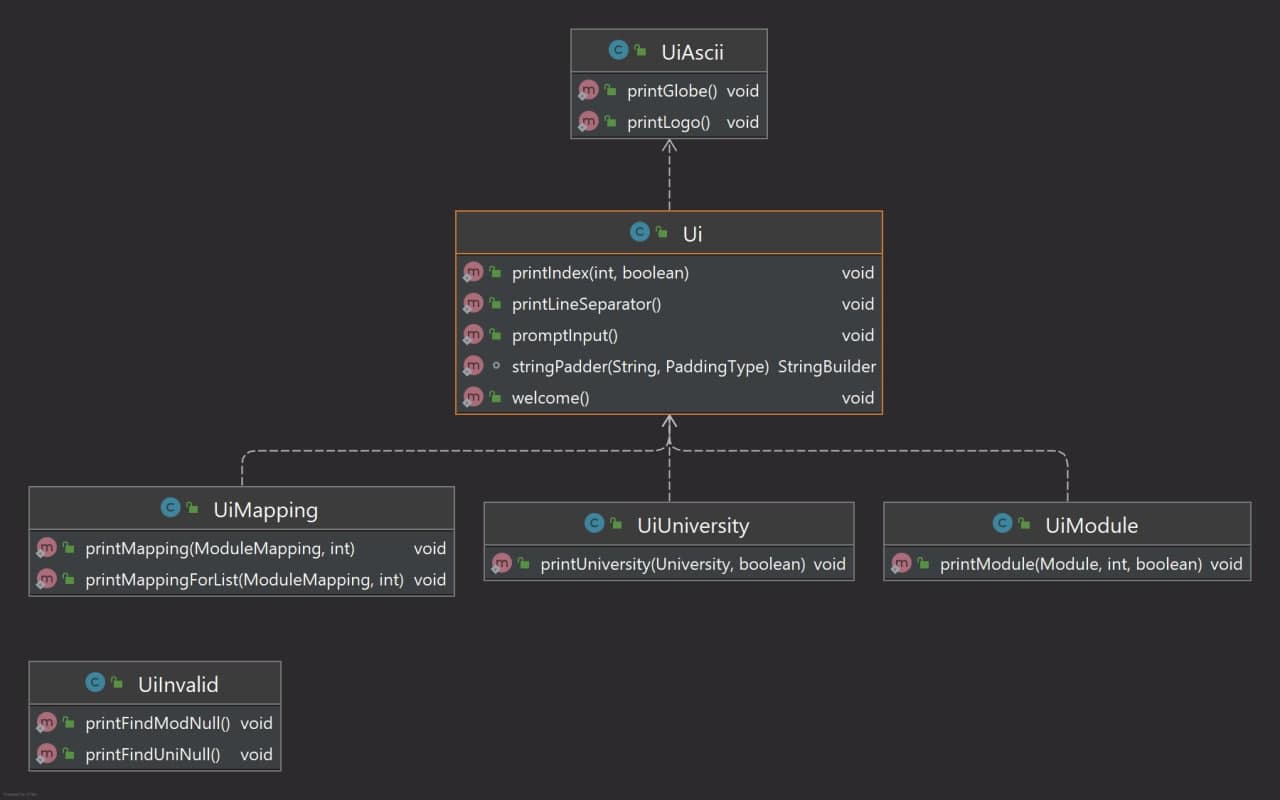
The UI component
- Displays different object types such as University, Module and Module mapping.
- Provides means of customization for display formatting.
- Summarizes different parts of the program into callable methods.
Storage
The storage component can implement the below features:
- Read the list of module mappings offered by each university from the CSV file.
- Read the list of NUS modules which can be mapped from the CSV file.
- Save both user’s module mappings for each university and their selected NUS modules in text file and read them back into corresponding objects.
University and module related classes
The following diagrams are the class diagrams of the classes:


This component consist of the following classes:
University
- Stores basic information of a university.
- Stores the unique index for each university in
index, this index can be used to refer to a specific university in the commands. - Stores the university name in
name. - Stores
ModuleMappingobjects associated to this university in an array listlist. - For
Universityobjects under the master list,liststores all possible module mappings from this university for the user to choose from. - For
Universityobjects under the selected list by the user,liststores all the module mappings the user has chosen to add to this university for their SEP application.UniversityList
- Stores
Universityobjects. - Can be used under the following 2 circumstances:
- Stores the master list containing all universities available for CEG SEP application. This list is directly read from an external file
University.csv. - Stores the selected list containing all universities added by the user. This list can be amended by the user, and all change to it will be stored under
data/selectedUniversities.txt.
- Stores the master list containing all universities available for CEG SEP application. This list is directly read from an external file
- Contains methods to search, filter, or amend the list based on command from the user.
Module
- Stores basic information of a module.
- For NUS modules, stores the unique index for each module in
index, this index can be used to refer to a specific module in the commands. - Stores the module code in
moduleCode. - Stores the module name in
moduleName. - Stores the modular credits of this module in
moduleCredits.ModuleList
- Stores
Moduleobjects. - Can be used under the following 2 circumstances:
- Stores the master list of all NUS modules available for the users to choose from.
- Stores the selected list unique to each user based on the modules they choose to take.
ModuleMapping
- Stores 2
Moduleobjects as a pair of module mapping. - Stores the local NUS module in
localModule. - Stores the partner university module in
mappedModule.
Parser Component
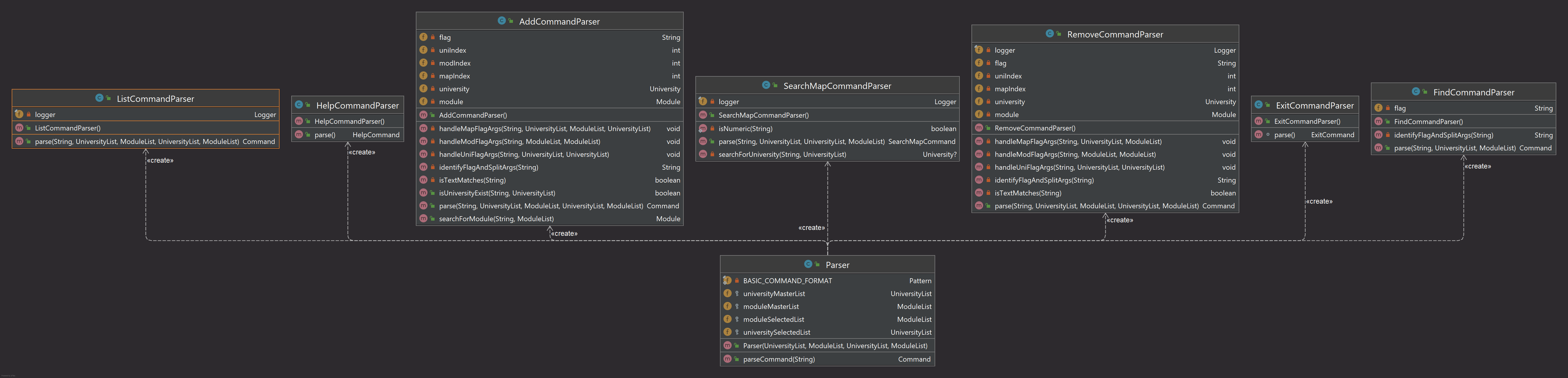 The parser component is made up of the following classes:
- Identify the command word and invoke the respective argument parser for the command.
- Handle the arguments and return the respective Command object.
Parser
This is the main parser class that will handle raw inputs and identify command words and invoke the respective command parsers.
AddCommandParser, RemoveCommandParser, FindCommandParser, SearchMapCommandParser, HelpCommandParser, ExitCommandParser
These class when invoked, will handle the flags and arguments and invoke the specific Command classes and handle the arguments.
Product scope
Target user profile
SEPlanner is targeted at Computer Engineering students in NUS planning for their Student Exchange Program (SEP).
Value proposition
Student Exchange Program is one of the most stressful and difficult things to plan for in a NUS students life. With multiple sources of information and a frustrating webpage to navigate, SEPlanner aims to organise a list of potential exchange Universities based on the users study plan, module requirements and personal preference.
User Stories
| Version | As a … | I want to … | So that I can … |
|---|---|---|---|
| v1.0 | new user | see the list of possible schools for exchange | view my options for SEP |
| v1.0 | new user | see the list of available NUS modules | decide on which NUS modules I want to complete during SEP |
| v1.0 | beginner user | add a University to my preferred list | view the Universities that I am interested in |
| v1.0 | beginner user | add a NUS Module to my preferred list | save my module preferences for the future |
| v1.0 | beginner user | list down all Universities in my preferred list | keep track of my target schools for SEP |
| v1.0 | beginner user | list down all NUS modules in my preferred list | keep track of the list of NUS modules I want to complete during SEP |
| v1.0 | beginner user | delete a University from the selected list | remove the University that I am not interested in |
| v1.0 | beginner user | delete a module from the selected list | remove the module that I do not consider to enrol in the future |
| v1.0 | user | enter commands and arguments to the application | interact with the application on the command line in an efficient way |
| v2.0 | familiar user | save my university and module information | maintain access to my information when I restart the application |
| v2.0 | new user | view the program instructions | refer to them when I forget how to use the application |
| v2.0 | familiar user | find a University by name | locate a University without having to go through the entire list |
| v2.0 | familiar user | search the available module mappings for a University based on the selected module list | get a list of module mappings for this university based on my selected modules |
| v2.0 | familiar user | add a pair of module mapping for a university | save a module mapping under the university that I selected |
| v2.0 | familiar user | delete a mapping pair of module for a university | remove a module mapping under a selected university |
| v2.0 | familiar user | pass in University as command argument using its index in the master list | access the exact University I want without having to type out its full name and facing bugs caused by typo |
Non-Functional Requirements
{Give non-functional requirements}
Glossary
- glossary item - Definition
- Master University List The list of all partner universities.
- Master Module List - The list of all NUS modules available for mapping.
- Selected University List - The list of partner universities the user selected.
- Selected Module List - The list of modules the user selected.
Instructions for manual testing
{Give instructions on how to do a manual product testing e.g., how to load sample data to be used for testing}